
Asthma Search
List all patients with an asthma diagnosis.
Before you begin
Search > Asthma
The Asthma Search tool lists all patients with an Asthma diagnosis recorded in their history.
After the practice is registered for the Asthma incentive, this tool enables you to contact the patient by mail, to attend the surgery and complete the Asthma 3+ Visit Plan. The practice is then eligible to receive the Service Incentive Payment (SIP-asthma).
Procedure
-
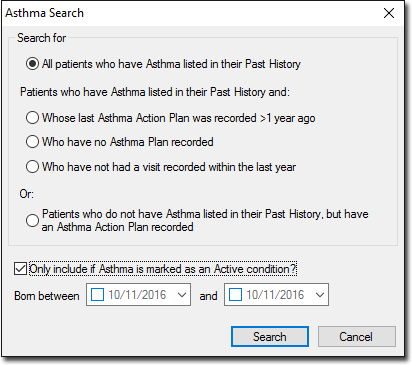
From the Clinical Front Screen, select . The Asthma Search window appears.
-
Enter the appropriate search criteria and click Search. The search results are displayed in the Asthma Search Results window.
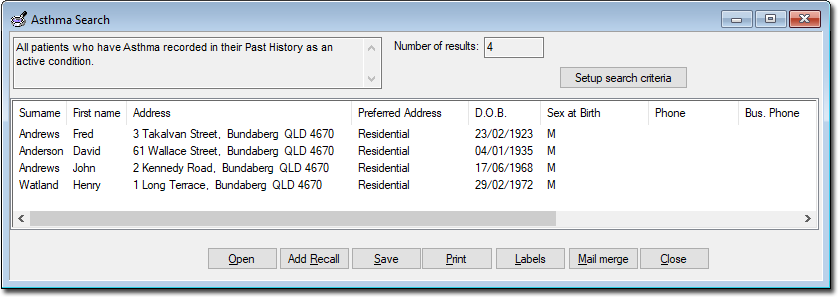
Open Opens the Clinical Window of a selected patient. Add Recall Records a Recall notification for each patient in the search results. See Adding, Editing, and Deleting Recalls for instructions on how to generate recalls. Save Saves a database file of the search results. Print Prints a copy of the search results. Labels Prints a set of labels for patients in the search results. Mail Merge Prints a letter for each patient in the search results.