
Cervical Screening Result Searches
List patients with a cervical screen recorded.
Before you begin
In the case of No Recorded Cervical Screening, the search facility searches for female patients who have reached a pre-defined age (by default this is normally set to patients 13 years or older but can be adjusted via Clinical Options).
Search > Cervical Screening Results
To search the Cervical Screening database:
Procedure
-
From the Clinical Front Screen, select . The window appears.
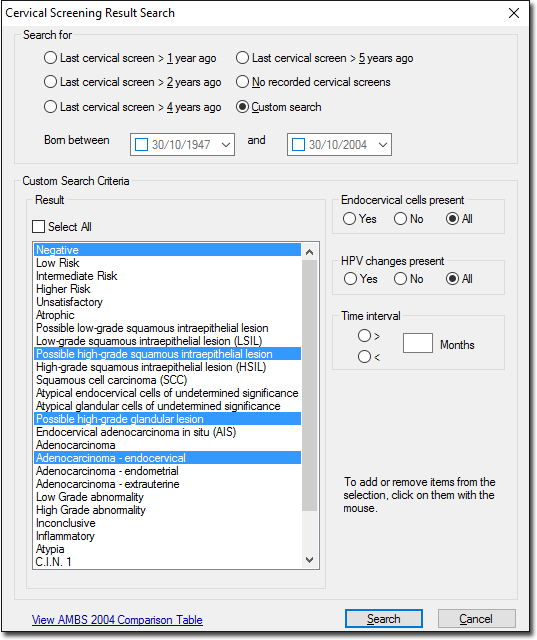
-
Click Search The window is displayed with the search results.
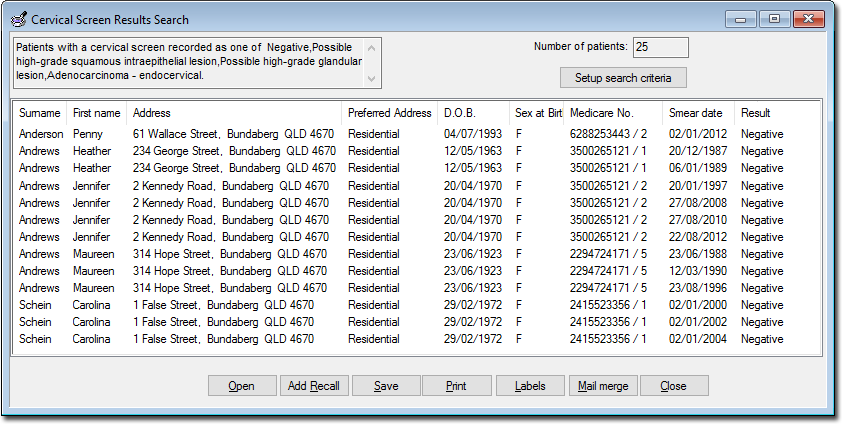
Open Opens the Clinical Window of a selected patient. Add Recall Records a Recall notification for each patient in the search results. See Adding, Editing, and Deleting Recalls for instructions on how to generate recalls. Save Saves a database file of the search results. Print Prints a copy of the search results. Labels Prints a set of labels for patients in the search results. Mail Merge Prints a letter for each patient in the search results.