
Write a DVA DAA Prescription or Review
Create a DVA prescription with an authority number for a DAA supply or VSMR review.
About this task
To set up a DVA-funded Dose Administration Aid (DAA) service for a veteran, you prescribe:
- The medications
- Six months of the DAA service
- A Veteran's Six Monthly Review (VSMR) of the service in six months time
To prescribe the DAA service and VSMR:
- Call the Veterans' Affairs Pharmaceutical Advisory Centre (VAPAC) on 1800 552 580 to obtain authority prescriptions for the six-month service and VSMR.
- Follow the prescribing procedure in Creating New Prescriptions with the following changes.
Procedure
-
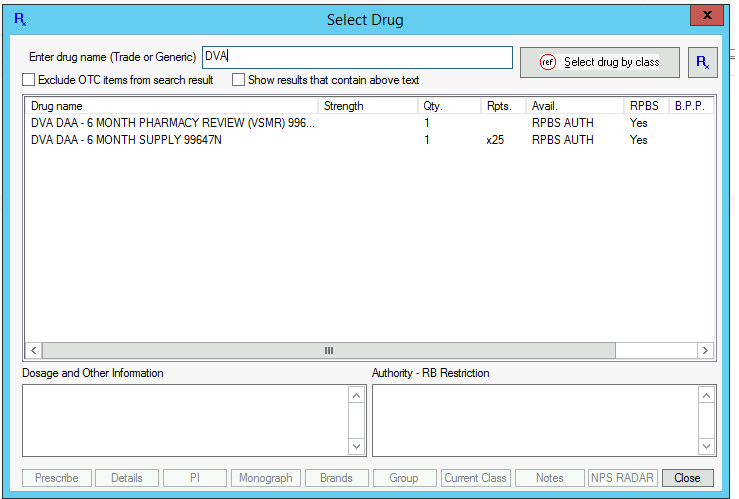
In the Select Drug window, type DVA
in the Enter drug name (Trade or Generic) field.
Tip:Alternatively, type DAA and set Show Results that contain above text.
-
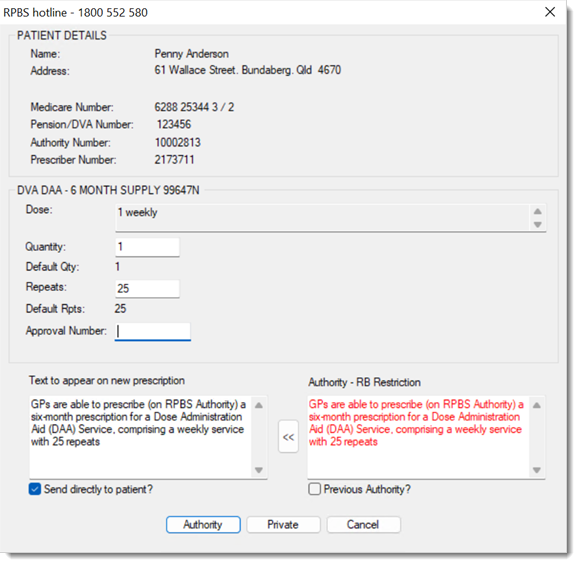
In the RPBS window, Approval Number
field, ensure that the repeats are correct and type the approval number for the
DAA or VSMR or set Previous Authority?.
Results
 Current Rx tab.