
MedicalDirector Automatic Updates
Automatically download incremental updates for Clinical, Pracsoft, and Bluechip.
MedicalDirector
releases updates to its software applications from time-to-time. These updates are
provided to customers as downloads, available to registered users via:
- MedicalDirector Automatic Update. This utility uses your active Internet connection to automatically download incremental updates for Clinical, Bluechip, and Pracsoft. It can also download and automatically install updated content for Clinical.
- The MedicalDirector website.Note:After MedicalDirector Automatic Update has been installed, you might need to configure the firewall to allow it Internet access in order to search for and download updates to MedicalDirector software.
This section describes automatic updates to MDref content.
 |
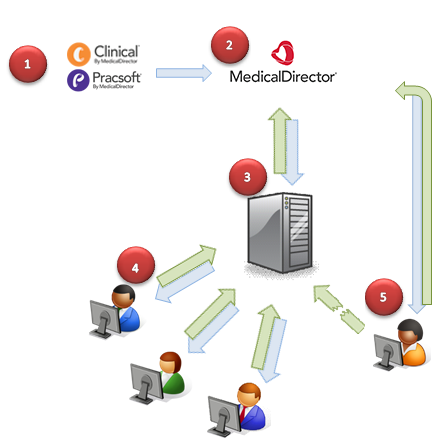
An update for a MedicalDirector software application is developed. |
 |
The update is made available to registered users via the MedicalDirector website. |
 |
Your practice's server computer periodically checks the MedicalDirector website for updates. When it finds a new update, it downloads the update to the server computer. |
 |
Your practice's workstation computer(s)
periodically checks your server computer for available
updates. It displays a message when an update is
available. You can download and install the update now, or download it now but install it at a later time. |
 |
If the connection between your server and workstation(s) is unavailable, each affected workstation attempts to check MedicalDirector for updates directly, and if an update is available, download it. |