Filtering/Searching Correspondence Records
- - How to Remove Items
from the Notation Filter
F5
Correspondence > Check Holding File
You can filter correspondence records or search records for content wherever Correspondence records are located.
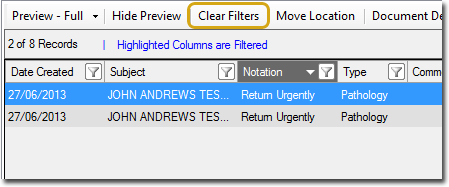
Upon applying a filter, the list of records refreshes to show only those results that match your selection. In the example below, the Notation column header is highlighted in dark grey to indicate that a filter has been applied to it. Although the image shows a single column as having been filtered, it is possible to apply a filter to multiple columns simultaneously (see Advanced Filtering, below)
Clear a filter by clicking Clear Filters.