When a patient dies, mark them as deceased in their patient record.
About this task
If a patient is marked as deceased, their clinical data is stored so it remains accessible but is
hidden from view and from standard patient searches. Patients incorrectly marked as deceased can be reactivated with the
Patient Reviver utility.
Procedure
To mark a patient as deceased:
-
From the Clinical main screen, either:
- Open the Select Patient from List window by clicking or pressing F2.
- Open the Patient Database by
clicking or pressing F10.
-
Select the patient you want to mark as deceased.
-
Press Delete.
-
In the Delete Patient window, click Mark as
Deceased.
-
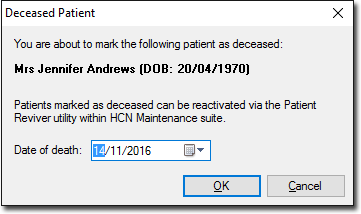
In the Deceased Patient window, check patient's name and
date of birth to ensure this is the correct patient.
-
In the Date of Death field, enter the date when the patient
died, or click the calendar and select the date.
-
Click OK.
Results
The patient record is marked as deceased and removed from the
list.
What to do next
If the patient was marked as deceased incorrectly, use Patient Reviver to restore their record.
