
Managing Aliases / Breaking Aliases / Linking Aliases to Other User Names
Before you begin
As well as providing a quick method for linking aliases with your user name, Clinical provides a facility for linking aliases to other users. Furthermore, you can use this facility to break the link between a user name and the aliases associated with it, if required.
You may find it necessary to break the link between your user name and an alias your laboratory has used, if for example you had accidentally linked an alias with your user name when it actually related to another user in your database.
In the following scenario, Dr. Anthony Practitioner has linked his user record with three aliases; 'DR A PRACTITIONER HL7', 'A PRACTITIONER', and 'DR T PRACTITIONER'. He then discovers that the latter alias (DR T PRACTITIONER) appears twice in the Holding File;
- One instance comes from a laboratory called Better Health Labs who refer to him in their database as "Tony" instead of "Anthony".
- The other instance comes from Aus Pathology Services, and relates to another user at the same practice, Dr. Tony Practitioner. Dr. Anthony Practitioner now needs to break the link he had established between his user name and Tony's alias.
Procedure
-
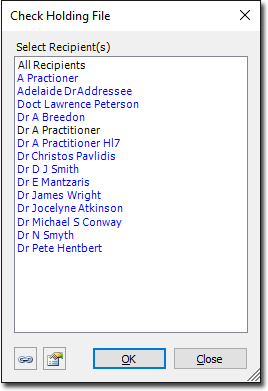
From the Clinical front screen select . The Check Holding File window appears.
-
Click
 The Manage User Aliases window appears.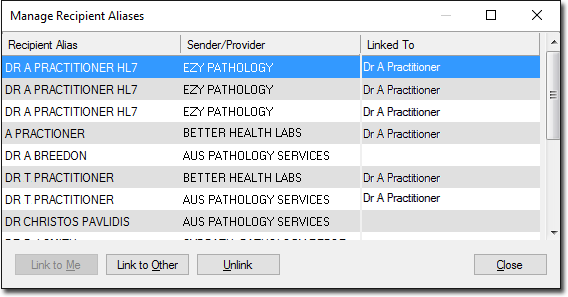
Note the following information regarding the example above:- Dr. Anthony Practitioner is currently linked with the following laboratory aliases;
- DR A PRACTITIONER HL7
- A PRACTITIONER
- DR T PRACTITIONER
- This last laboratory alias (DR T PRACTITIONER) appears twice;
- One instance relates to results sent from a laboratory called Better Health Labs.
- A second instance relates to results sent from a laboratory called Aus Pathology Services.
- In this scenario, Dr. Anthony Practitioner needs to break the link between his user name and the alias 'DR T PRACTITIONER' for the laboratory Aus Pathology Services.
- Dr. Anthony Practitioner is currently linked with the following laboratory aliases;
-
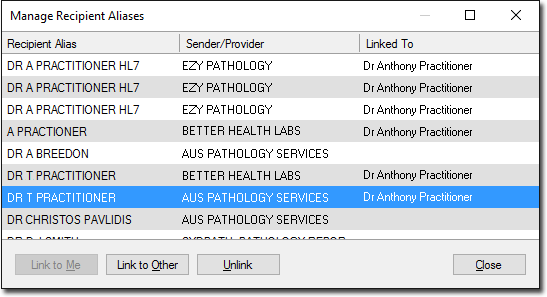
Locate and select the alias-sender/provider-username combination you wish to break the link for.
-
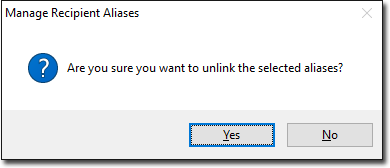
Click Unlink You will be prompted to confirm this
action.
-
Click Yes to confirm. The Manage User
Aliases window is refreshed.
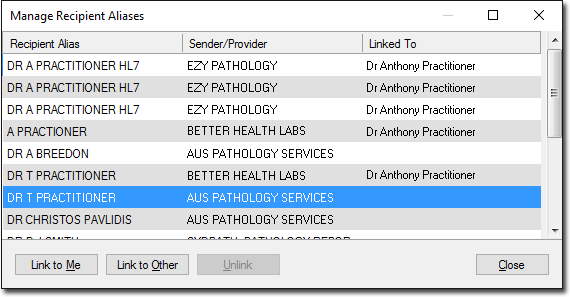
Now that the link has been broken, note the following information regarding the example above:- The alias of DR T PRACTITIONER for the sender/provider Aus Pathology Services is no longer linked with the user name Dr Anthony Practitioner.
- Now that this alias-sender/provider combination is no longer linked with a user name it is available to be;
- Linked to 'me' (i.e. the user currently logged in).
- Linked to Other (another user).Note:where you have multiple recipients in your database who have the same name and you associate the first recipients with an alias used by a specific provider, upon viewing results assigned to them, they will see all results for them along with any other recipients who share their name, until you have configured the alias-to-provider relationship(s) for the other similarly-named recipients.