
Merge Duplicate Doctor Records
Export doctor tables to send to MedicalDirector Customer Service for merging.
Before you begin
The following procedure can be performed from any computer with Clinical or Pracsoft installed, and that has email facilities.
Procedure
-
Open the MedicalDirector
Install Manager Mechanic:
- Select Windows , and browse to C:\Program Files\Health Communication Network\Common\HCNInstMngr\HCNInstMngr.EXE
- In the Run window, append /mechanic
to the end of the Open line.
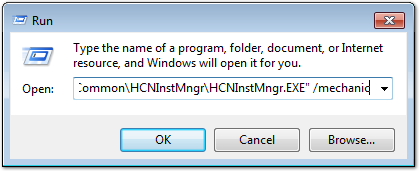
- Click OK.
-
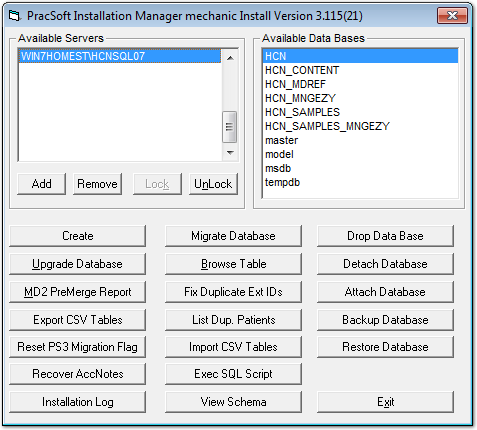
In the Mechanic window, select your server in the
Available Servers list, and the database
HCN in the Available Data Bases
list.
-
Holding the CTRL key down on your keyboard, individually
select the following tables in the Table Export Selection
Manager:
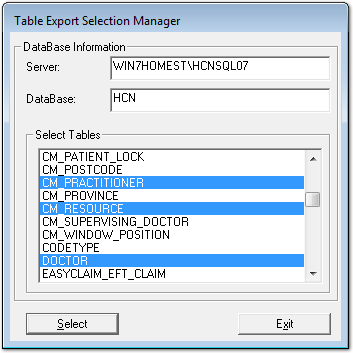
- CM_PRACTITIONER
- CM_RESOURCE
- DOCTOR
- PRAC
Results
If the export was successful a new file called PS3XPRT or PS3XPRT.DAT will appear on your Desktop.
If an email client is set up on the computer, right-click the file and select . If an email client is not available, the file will need to be emailed via other means. The file must be emailed to medicaldirector-support@health.telstra.com
What to do next
After the email and signed Data Consent Form is received, MedicalDirector Customer Service will be in contact at a later date when a specialised SQL script has been created to merge the duplicate doctors.