
Moving Sensitive Data
You must take steps to protect sensitive patient data from misuse, interference, loss or unauthorised access or disclosure.
Before you begin
Moving sensitive patient information onto removable media such as USB, thumb drive, flash drive, external hard drive or CD/DVD contains should only be done where absolutely necessary, and in line with your organisation’s policies on media, and data and security management, as removable media can be easily misplaced, lost or stolen.
If you need to move sensitive patient information onto removable media, you must ensure your patient’s sensitive information is best protected in the event the data is misplaced, lost or stolen. This page sets out some measures you should take to protecting data on removable media.
You should be familiar with the Australian Privacy Principles (APPs) and your responsibilities. Under the Privacy Act 1988 (Privacy Act), the Australian Information Commissioner may issue guidelines regarding acts or practices that may have an impact on the privacy of individuals. For the latest APPs that impact on the privacy of individuals and your responsibilities, see https://www.oaic.gov.au/.
About this task
- The files are archived (zipped) into a single file.
- The zip file is encrypted with AES-256 encryption algorithm.
- A password (encryption key) is applied that meets the definition of a strong password.
Procedure
-
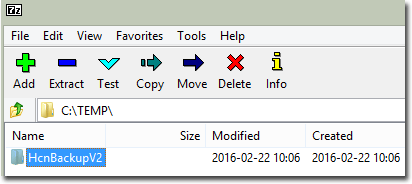
In 7-Zip, locate, select and highlight the folders or files you want to archive
and encrypt.
-
Click
 Add.
Add.
-
In the Add to Archive window:
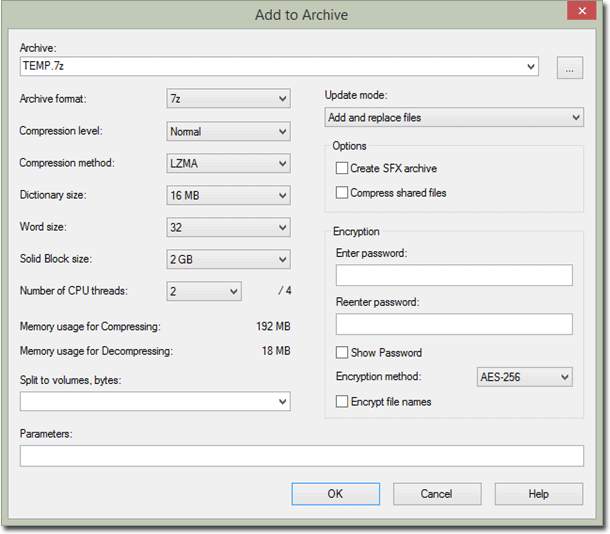
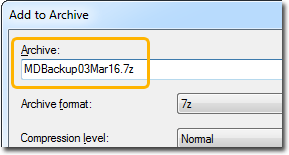
- In the Archive field, name the archived
file.
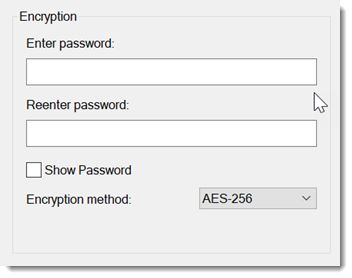
- In the Encryption section, in
the Enter password field, add a strong password.
 Tip:You must remember this password.
There are many free websites that will generate a random strong password for you. In your browser, search for ‘strong password generator’ or ‘password generator’.
- In the Reenter password field, enter the same password again.
- From the Encryption method list, select AES-256.
- Click OK.
- In the Archive field, name the archived
file.
Results
What to do next
- Ensure that 7-Zip is installed on the computer to which you want to unencrypt the archived file.
- In Windows Explorer, right-click on the archived file and select .
- In the Enter password window, enter the password you added to the file in step 6.b.
The file is unencrypted and the contents are accessible.