
Obstetrics Module
Record and manage a patient's obstetric information on the Obstetrics tab.
This tab is available for female and gender neutral patients who have reached a predefined age (15 years or older by default). This setting be adjusted via Clinical Options. This tab is used to store an obstetric history and details of antenatal visits for each pregnancy.
Obstetric management is performed via the Obstetric tab in the patient's Clinical Window.
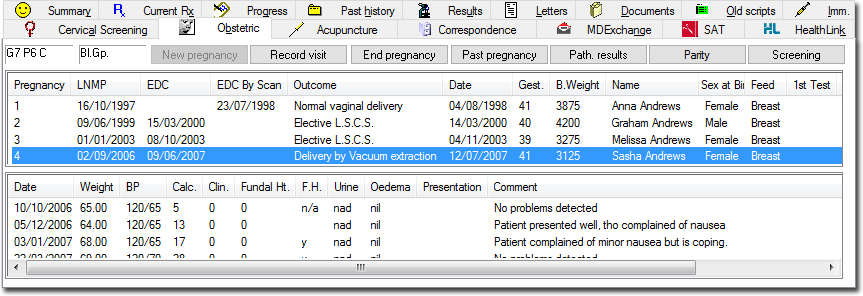
- The pregnancy number indicates the total number of times the patient has been pregnant, not the number of pregnancies recorded in Clinical.
- The lower section of the window displays data for each of the patient's visits during that pregnancy. The example above currently displays information for all the visits relating to pregnancy number 4.
- If you delete a pregnancy record from the list, all associated visit data for that pregnancy will also be lost.
- You can delete a specific visit by first selecting it from the
list of visits in the lower half of the window.
The Add Item
 and Delete Item
  buttons behave differently, depending on the
patient's pregnancy state, and depending on what data is
currently selected.
buttons behave differently, depending on the
patient's pregnancy state, and depending on what data is
currently selected.For example, if the patient is not currently pregnant, clicking the
button will record
a new pregnancy. However, if the patient is
currently pregnant, this button will record a new
visit.To delete a specific row of visit data, select the required visit item and click
Delete. To delete a pregnancy record from the list,
select the required item and confirm your action.