
Jump to main content
Clinical by Telstra Health logo
MedicalDirector Clinical Knowledge Centre
  • Get Started
  • Patient Management
  • Clinical Management
  • Correspondence
  • Administration
  • Searching and Reporting
  • Integrations
  • Resources
  • Support
Index
Support
Version 4.4
V4.4 V4.3a V4.3
  1. Home
  2. Clinical Management

    Use Clinical to record your consultations with a patient and their clinical details.

  3. Investigations

    Manage pathology, cytology, and medical imaging requests and results.

  4. Managing Investigations Requests

  5. eOrders - Overview

    Order pathology and cytology requests electronically.

  6. eOrders - Pathology Requests

  7. Method 3: Select from Favourites

  • Clinical Management

    Use Clinical to record your consultations with a patient and their clinical details.

    • Actions

      An action is a record of something that was done or is to be done for a patient.

    • Progress Notes

      Record notes about a patient's visit in Progress Notes.

    • Select Drug

      Contains all compounds currently available in the country of use (currently Australia), and includes all scheduled compounds, and the majority of 'over-the-counter' preparations.

    • Prescribing

      Use Prescribing to prescribe medications to your patient, conforming with all requirements and regulations.

    • Examinations

    • Recalls

      A recall is a type of flag recorded against a patient's record to inform practitioners or practice staff of when a patient is due to return to the practice, usually so that some clinical procedure can be performed.

    • Patient's Medical History

      History includes a patient's medical conditions, both active and inactive.

    • Investigations

      Manage pathology, cytology, and medical imaging requests and results.

      • Managing Investigations Requests

        • eOrders - Overview

          Order pathology and cytology requests electronically.

          • Prerequisites for eOrders

          • Configuring Investigations Options for eOrders

          • Accessing the eOrders Module

          • Getting Help with eOrders

          • eOrders - Cytology Requests

          • eOrders - Pathology Requests

            • Method 1: Order by Test Name

            • Method 2: Select from Specialty Groups

            • Method 3: Select from Favourites

            • Option 1: Include the day's Progress Notes

            • Option 2: Indicate if the patient is Diabetic, Fasting, or Pregnant.

            • Option 3: Include one or more of the patient's current medications.

            • Option 4: Send Copy to Doctor

          • eOrders - Favourites Lists

          • eOrders - Prior Orders

        • Requests - Cervical Screening

        • Requests - Medical Imaging

          Create an imaging request from the patient's record.

        • Requests - Pathology

          Practitioners can initiate a pathology test request for a patient during their consultation.

        • Requests (Outstanding)

          Match requests to results already in the patients' records, then delete the duplicates.

        • Managing New Results

        • Managing Previous Results

        • Moving Results and Correspondence Between Patients

          You can move an Investigations Result or other form of correspondence, from one patient's record to another.

        • 2D Barcoding

          2D Barcodes help streamline the processing of pathology requests.

        • Filmless Image Technology (FIT)

      • HL7 Investigations Results and Clinical

    • Immunisations

      Manage a patient's immunisations.

    • Preventive Health Prompting for Specific Patients

      Customise preventive health prompts for specific patients in the following areas, such as blood glucose, blood pressure, smoking and so.

    • Assessments

    • Cervical Screening

    • Obstetrics Module

      Record and manage a patient's obstetric information on the Obstetrics tab.

    • Diabetes Module

    • Summaries

      Print summaries for patients.

    • Measurements

      The Clinical measurements window displays the history of a patient's various clinical measurements.

    • MedicalDirector Care

      Create Care Plans in MedicalDirector.

    • Telehealth

      Consult with patients remotely.

    • Honeysuckle Health Private Health Insurance Checker

    • Tools

    • Surgical Audit Tool

      Use the Surgical Audit Tool to record information about surgical procedures.

    • Medication Charts

      Print a variety of Medication Charts from Clinical.

Method 3: Select from Favourites

Before you begin

Procedure

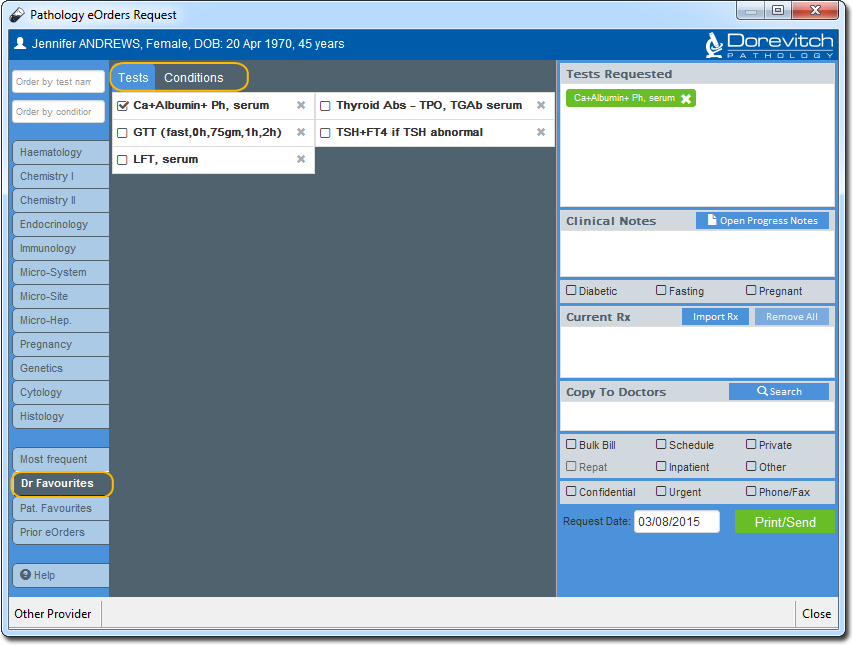
  1. Select from your Doctor or Patient Favourites, located at the lower-left of the window.

Results

What to do next

Perform any of the following optional steps:

  • Option 1: Include the day's Progress Notes
  • Option 2: Indicate if the patient is Diabetic, Fasting, or Pregnant.
  • Option 3: Include one or more of the patient's current medications.
  • Option 4: Send Copy to Doctor
18 June 2026
© 2026 Telstra Health