
Create a New Recipe
Create a new recipe that any prescriber at your practice can use.
Before you begin
About this task
Procedure
To add a new recipe:
-
In the Extemporaneous Preparation
panel, provide a new recipe information in the following
fields:
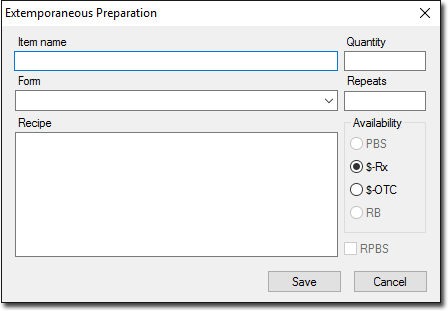
- Item Name - enter a distinctive and descriptive name for the item (for example, Psoriasis cream). This name can be searched for in the same way as any other drug when prescribing from the drug list.
- Form - choose the form of the recipe from the list.
- Recipe - enter the ingredients and method in the Recipe box. This section will be printed on the prescription.
- Quantity and Repeats - provide the required Quantity and Repeats in the fields respectively.
- Availability - set PBS status. Setting PBS does not mean that it will be interpreted that way by the pharmacist.
- RPBS - set this option if the recipe is available as an RPBS item.