Customised File Formats
Create customised file formats for exporting Address Book or Demographic data.
Before you begin
You can also edit existing formats.
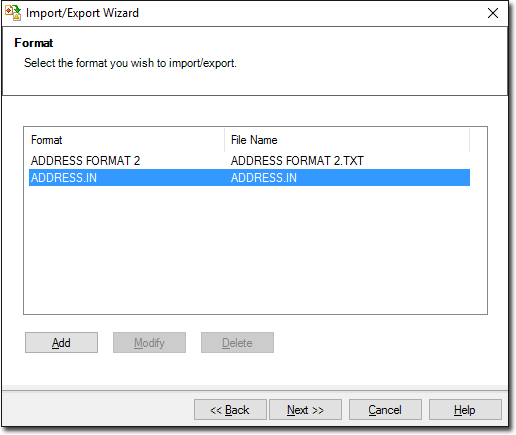
The Format facility is activated when you click the Add button in the Format window when conducting an export, as shown in the following image. When adding or modifying the file format, the Format window is displayed.
Procedure
-
Click Add to add a new file format. Alternatively you can
select an existing format and click Modify to make
modifications.
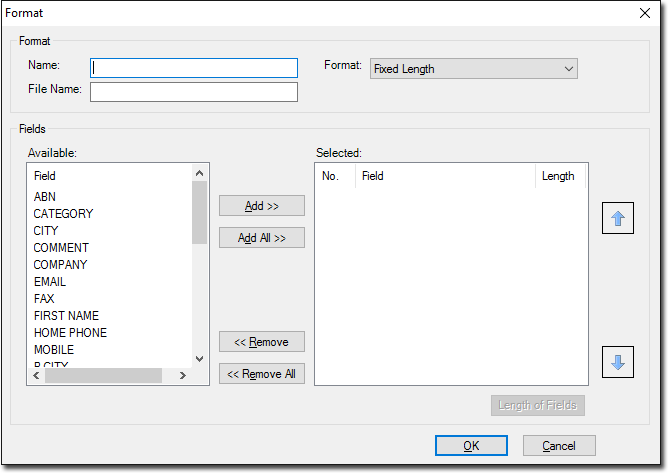
- Enter a name for the file format.
- Select a format style from the Format drop-down menu. Such styles include 'Comma Separated' and 'Tab Delimited'.
- Enter a name for the file. Notice that you must include a three-character file extension.
- Select which fields you want to include from the Fields menu.
- Click the up arrow or down arrow to control the file format as appropriate.
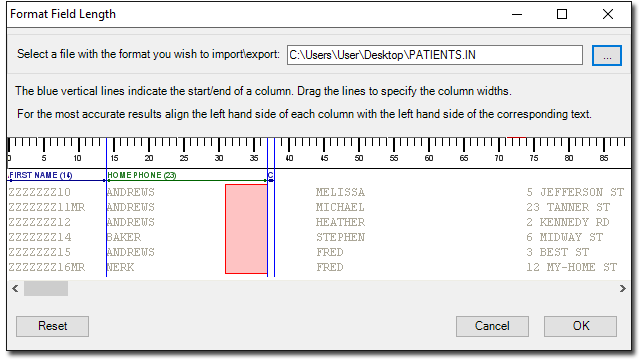
- Click Length of Fields to manually configure the length of each field to be exported. See image below.
- By clicking and dragging each of the blue field divider lines, each field width can be re-sized to suit your needs. See image below.
- By clicking
 Ellipsis you can select a file that you already have access to and use it as
a template for the format you are creating, as indicated following. The area
marked in red indicates the amount that particular field has been
re-sized.
Ellipsis you can select a file that you already have access to and use it as
a template for the format you are creating, as indicated following. The area
marked in red indicates the amount that particular field has been
re-sized.