Add page numbering to letters.
Procedure
To add automatic page numbering to a
letter:
-
From within Letter Writer, select .
-
In the Page Numbers window:
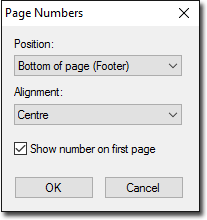
- Choose the position of the numbers in either the header or footer of each page.
- Choose how you want the numbering to be aligned.
- To include a page number on the first page of the letter, set Show
Number on First Page.
-
Click OK to confirm your selections.
Results
Page numbering is applied to your letter.
