Creating CDA e-Health Documents
CDA documents can be shared between registered practitioners via systems such as MDExchange and My Health Record.
Before you begin
As an author of a CDA document, you are responsible for its content.
CDA e-Health documents cannot be accessed from outside a patient's record, nor can their templates be modified. When creating any CDA document, data marked as confidential, or data under the Surgical Audit Tool tab will not be included on the CDA form.
CDA documents that display Past History items require that you have recorded the History items using a valid date format.
The Date field in a CDA eHealth document displays:
- As blank if the date and year are not recorded for the Past History item.
- The year only, if the year is present but no date has been recorded, or if the year is present but the date field contains text which is not in a recognised date format, or is not a month (or abbreviation of) in the Past History item.
- A date, if no year is present but the date is present in the Past History item.
- Month and year, if month and year are recorded but no date is present in the Past History item.
About this task
CDA e-Health templates include:
- CDA e-Referral
- CDA Event Summary
- CDA Shared Health Summary
- CDA Specialist Letter
Procedure
-
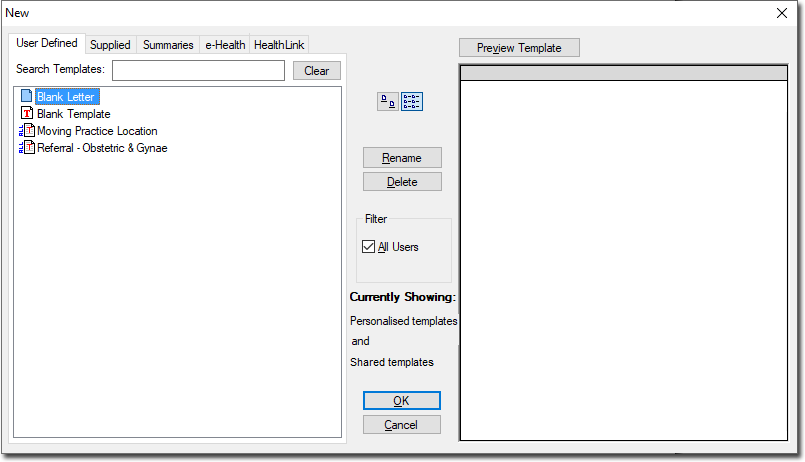
From the New window, select the e-Health tab and then double-click the CDA e-Health template you wish to use.
-
You can then send the document;
- Via MDExchange, by clicking
 Use this method if you wish to send the document directly to another user. Note
that if you select this method you can also upload the document to My Health Record (as explained
following, at Step 10). See Sending Messages via MDExchange for the remaining steps for sending
a CDA Document via this method.
Use this method if you wish to send the document directly to another user. Note
that if you select this method you can also upload the document to My Health Record (as explained
following, at Step 10). See Sending Messages via MDExchange for the remaining steps for sending
a CDA Document via this method. - Via an External Transport method by clicking
 Note that if you select this method you can also upload the document to My Health Record (as explained
following, at Step 10).
Note that if you select this method you can also upload the document to My Health Record (as explained
following, at Step 10). - Via My Health Record by clicking
 (uploaded to the My
Health Record system where it can then be accessed by the recipient).
Note that this button is only available to selected templates. If this button
is not available, you can still upload the document to My Health Record, as explained
following.
(uploaded to the My
Health Record system where it can then be accessed by the recipient).
Note that this button is only available to selected templates. If this button
is not available, you can still upload the document to My Health Record, as explained
following.
- Via MDExchange, by clicking
-
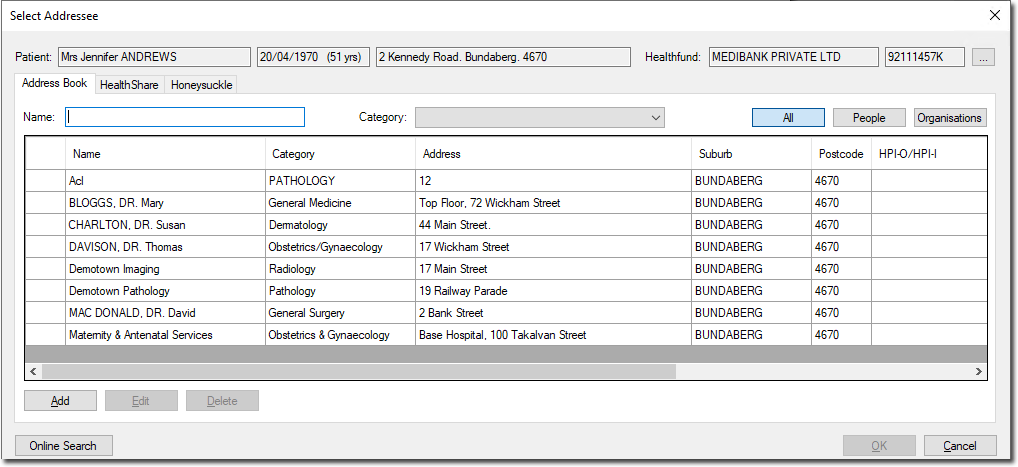
The Select Addressee window appears.