
Defaults Tab
Sets the default options when you open a Letter Writer.
To set up the default options, in the Preferences window, select the
Defaults tab.
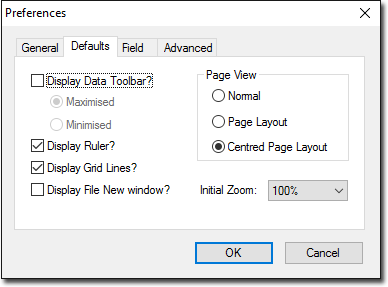
| Field | Description |
|---|---|
| Display Data Toolbar? | Displays the data toolbar automatically when you open Letter Writer or start a new letter or template. |
| Display Ruler? | Shows or hides the ruler, which can be used for modifying Indents, Margins, Tables and Tabs. |
| Display Grid Lines? | Sets the default for whether table grid lines are displayed. You can override the default setting during a session in Letter Writer, via . |
| Display File New Window? | Calls a New window automatically when opening the Letter Writer. |
| Page View | Sets the default page view or layout in the Letter Writer. |
| Initial Zoom | Sets a default zoom level. |