Before you begin
Tools > Print Options > Drug Sheet Tab
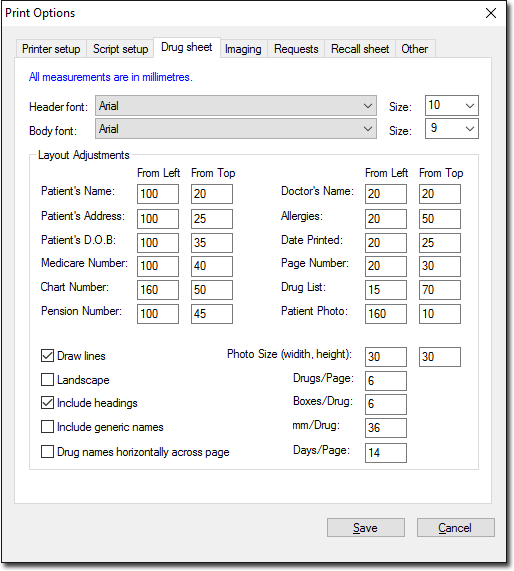
The Drug Sheet tab of Print Options allows you to adjust the layout, positioning and alignment of items printed on a practitioner's drug sheet.
To setup Drug Sheet printing:
Procedure
-
From the Clinical Front Screen, select . The Print Options window appears.
-
Select the Drug Sheet tab.
-
Enter settings as necessary. Use the table below for guidelines. The initial settings will print the standard Clinical drug sheet in portrait mode using standard fonts.
- If you enter 0 in both the From Left and From Top fields the relevant entry will not be printed on the drug sheet.
-
Click Save to save the settings and return to the Main window.
| Font Settings |
The font (typeface) and size of the Header font and Body font can be changed to suit individual requirements.Note: Changing these settings may cause items to overlap or appear in the wrong places, because of the differences in letter size and spacing of different fonts. |
| Layout Adjustments |
Specify in millimetres the placement of printed data.Note: Most printers have a non-printable area or margin. This margin is usually between 5 and 20 mm. If you find that text cropping occurs, adjust the positioning to suit. |
| Photo Size |
Refers to the printed size of Patient Portrait Photographs |
