
Dose Calculator

Determines the correct medication dosage for a prescription.

Before you begin

To calculate exact doses where any of the following parameters are known:
  • Number of units per Kg. The units can be anything.
  • The patient's weight.
  • Number of doses per day.

About this task

Use the Dose Calculator tool to save the calculated dose in the Enter Dose window.

Procedure

To calculate a dose:
  1. From the Clinical window, select Tools > Calculators > Dose.
    Tip:
    The Dose Calculator is also accessible from the Enter Dose window when creating a new prescription.
  2. In the Dose Calculator window, enter data into the fields offered.
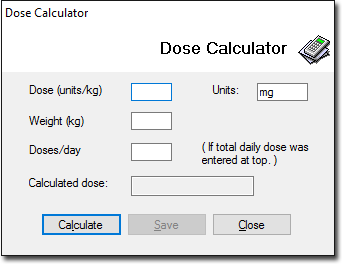
  3. To calculate the dose and display it in the Calculated dose field, click Calculate.
  4. Click Save.

Results

The calculated dose is saved to the Enter Dose window.