
Weight Calculator
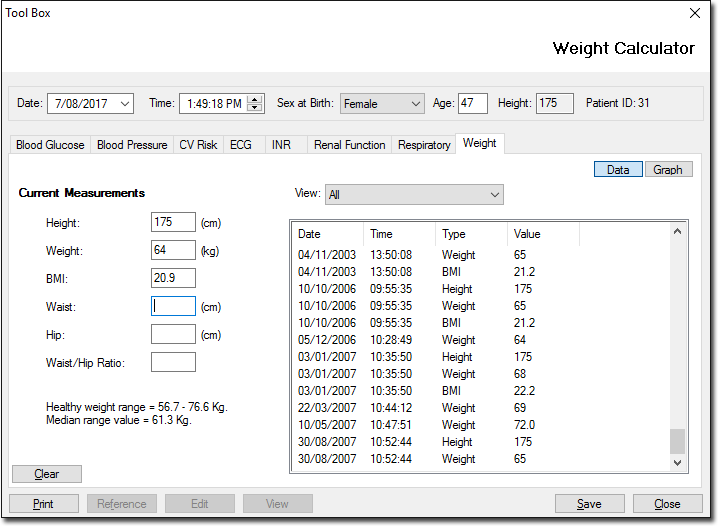
Records and tracks a patient's weight over time.
This tool automatically calculates the patient's Body Mass Index (BMI) and can be graphed
over time. Race-specific normal ranges are also provided.
Note:
This
calculator does not calculate the BMI for patients over 400cm. For patients under the
age of eighteen, the Weight tab will read Paediatric. For more
information, refer to Paediatric
Percentile Charts.
To access the Weight Calculator, either:
- Press Ctrl+Alt+W.
- In the Clinical window, select .
| Field | Description |
|---|---|
| Data | Displays the patient's record as a list of data. |
| Graph | Displays the patient's record as a graph. |
| Clear | Clears any data you enter into the Current Measurements section of the window. |
| Prints the patient's weight data. If you have filtered the data, this will be reflected in the printout. | |
| Reference | This option is inactive for Weight calculator. |
| Edit | This option is inactive for Weight calculator. |
| View | This option is inactive for Weight calculator. |
| Save | Saves data to the patient's record. |