Logging On

Logging on is a very important process, especially when operating in a multi-user environment.

Before you begin

The Clinical database contains medical data of a sensitive nature. For more information about access permissions and the user database, see Adding, Editing and Deleting Users.

Procedure

  1. Double-click the Medical Director iconClinical icon on your desktop.
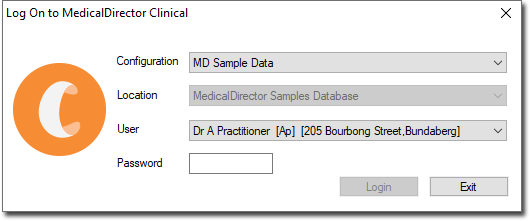
    MD clinical log on screen
  2. In the Log On to MedicalDirector Clinical window, select the following information:
    • From the Configuration list, select any of the following options:
      • MD Sample Data - a sample patient database is provided for you. If you want to use the sample database, select MD Sample Data and select a sample practitioner/user. For example, the password for Dr. A. Practitioner is password.
      • Configuration - if you want to use your live database, select Configuration. It is possible to have numerous configurations available to you, each of which may give you access to different patient databases.
    • Location - if your practice operates from different locations, select the current location.
    • User - select your user account for this selected database and location. Before you can log on, your user account must have been defined in the user database by another user who has the appropriate security permissions.
  3. In the Password field, enter your password.
    You are given three attempts at entering your password. If after the three attempts you fail to provide a valid password, MedicalDirector Clinical displays a warning before exiting.
  4. Click Login to confirm your information.

Results

Clinical sets who is using the system, what permissions or restrictions to apply, and in the case of a practitioner, what name to print on prescriptions and record in Progress Notes during consultations.

What to do next

To log on when MedicalDirector Clinical is already active, from the Clinical main screen select Users > Log On.

If you are sharing a computer with another user, each user can log in without the other first logging off; logging on with a different password automatically logs the previous user off on a shared computer.