Adjusts the layout, positioning and alignment of items printed on a practitioner's
drug sheet.
About this task
Use the Drug sheet tab in the
Print Options window to adjust the print settings for the drug sheet.
Procedure
To set up print options for the drug sheet:
-
From the MedicalDirector Clinical Homepage, select .
-
In the Print Options tab, select the Drug
Sheet tab.
-
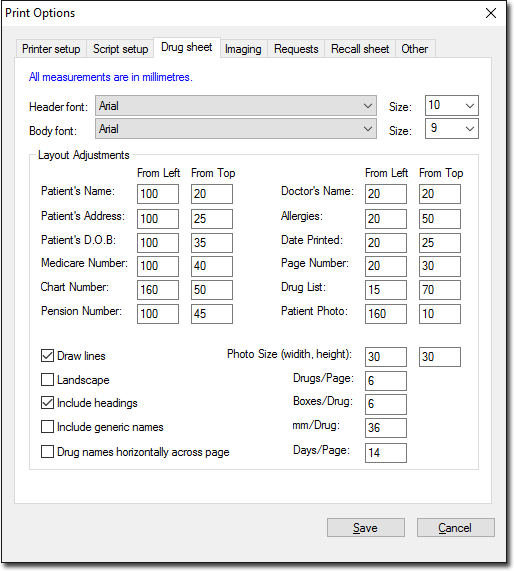
On the Drug sheet tab, edit the following settings as
appropriate:
- Font settings - change the font and size for the header and body. Changing
these settings may cause items to overlap or display incorrectly due to
differences in letter size and spacing of different fonts.
- Layout Adjustments - modify the position of the
patient's details, doctor's name and other information on the drug sheet. Most
printers have a non-printable area or margin, typically between 5 and 20 mm. If
you notice text cropping, adjust the positioning that you want.
Note: Measurements are in millimeters (mm).
- Photo Size (width, height) - changes the default
dimensions (width and height) of the photo. For more information, refer to
Patient Photographic Identification.
Note: If you enter 0 in both the
From Left and From Top fields,
the relevant entry will not be printed on the drug sheet.
-
Click Save.
Results
Print settings for a drug sheet are saved and will be applied
to all future printouts.
