
Renal Function Calculator
Calculate the patient's Glomerular Filtration Rate (GFR) based on their weight (kg) and the creatinine level (mmol/l).
The Renal Function Calculator uses both GFR (Cockcroft-Gault formula) and eGFR (Abbreviated MDRD formula).
To access the Renal Function Calculator, either:
- Press Ctrl+Alt+W. Click the Renal Function tab.
- In the Clinical window, select . The Renal Function Calculator is
displayed.
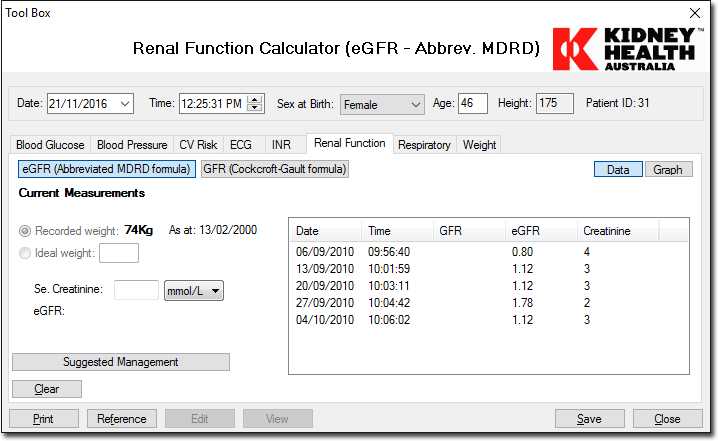
The Recorded weight and Ideal weight options are disabled when using the eGFR (Abbreviated MDRD formula).
| Field | Description |
|---|---|
| eGFR (Abbreviated MDRD formula) | Allows you to record and calculate eGFR values using the eGFR (Abbreviated MDRD formula). This option is selected by default. |
| GFR (Cockcroft-Gault formula) | Allows you to record and calculate GFR values using the GFR (Cockcroft-Gault formula). |
| Data | Displays the data window. |
| Graph | Displays the graph window. |
| Recorded Weight | Displays the recorded weight of the patient and the date the weight was
recorded. If no weight has been recorded the date defaults to today's
date. Note: This option is disabled when the
eGFR button is selected. |
| Ideal Weight | Select this option to enter an ideal weight for the patient. Note: This option is disabled when the
eGFR button is selected. |
| Se.Creatinine | Allows you to enter the patient's creatinine level. |
| GFR/eGFR | Displays the calculated GFR or eGFR once the relevant details are entered. |
| Suggested Management | Allows you to open the Suggested Management window.
This window provides information about the result, a description and the
clinical action plan. Note: If the GFR button
is selected this button is replaced by the Investigation and
Management Guidelines. The Management of Renal
Failure in General Practice Information window is
displayed. |
| Clear | Allows you to clear the entries made. |
| Prints the patient's renal function data. If you have filtered the data, this will be reflected in the printout. | |
| Reference | Allows you to open the Renal Function Calculator Reference window. This window displays any available renal reference sites. Click a URL to open the associated website. |
| Edit | This option is inactive for Renal Function Calculator . |
| View | This option is inactive for Renal Function Calculator . |
| Save | Allows you to save the details into the patient's record. |